
 Back
Back PAY YOUR BILLS SEAMLESSLY WITH M2U
 Over 600 billers are available in M2U including all credit cards, top loan and insurance providers, as well as RFIDs
- No need to enroll billers
- Add billers to your Favourites list to skip typing account details in your next transactions
- Schedule future and recurring bills payment so you don't have to worry about missing out your due dates
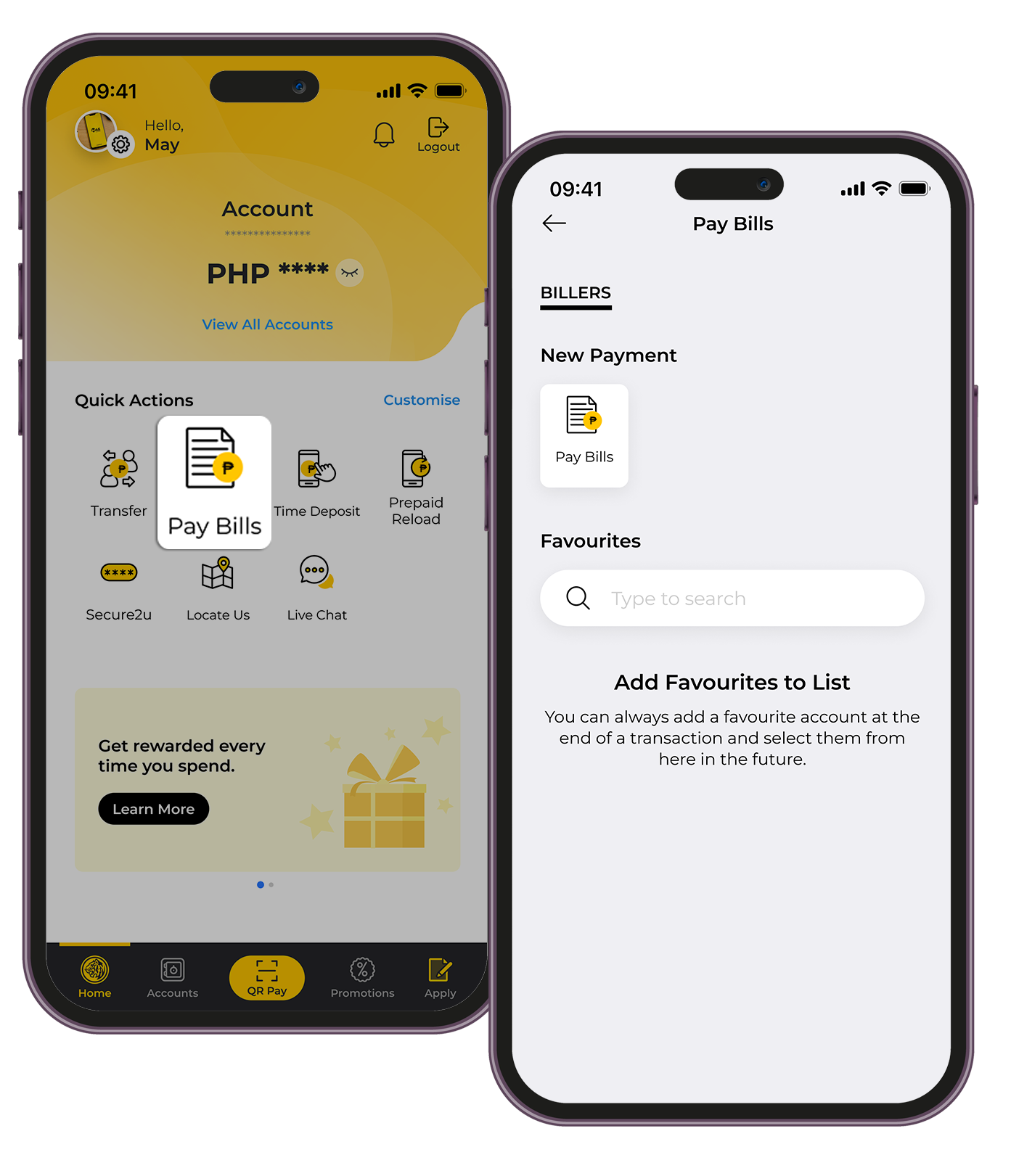
HOW TO PAY BILLS WITH M2U:
| 1. | Under Quick Actions on the Home Dashboard, tap "Pay Bills" |
| 2. | Select the account to Pay From |
| 3. | Select the Biller you want to pay, you can type on the search bar |
| 4. | Enter the Biller Account details |
| 5. | Enter the amount you want to pay |
| 6. | Confirm the details and approve the transaction with a tap via Secure2u. Take a screenshot of your receipt |
To view the list of available billers in M2U, click here.
Reminders
- Kindly ensure your Maybank Philippines source account has sufficient funds to avoid unsuccessful bills payment transactions.
- A convenience fee may be charged by your biller and deducted from your source account. The fee amount varies per biller but it will be reflected on your M2U confirmation screen.
- For a smooth transaction,kindly ensure that you encode the correct biller reference number or account number.